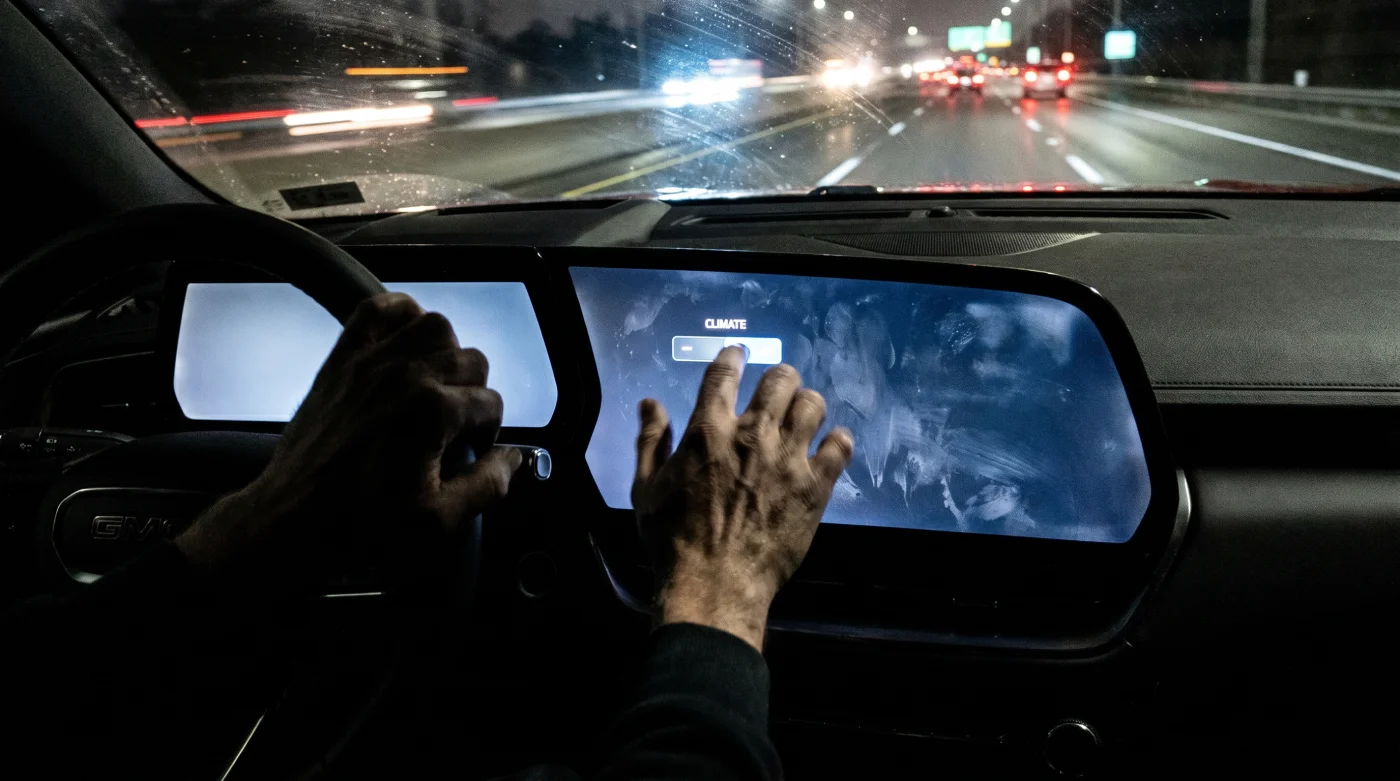
The cabin of a newly redesigned full-size SUV smells of fresh polymer, premium top-grain leather, and the faint, sweet scent of factory-applied adhesive. As you slide into the driver’s seat, the sweeping expanse of glass across the dashboard hums to life, casting a cold blue glow over your hands. It looks pristine, clean, and undeniably expensive. The absence of physical buttons suggests a minimalist sanctuary where technology has solved the problem of clutter.
But when you pull onto the interstate and the rain starts to smear across your windshield, that sanctuary begins to feel like a high-altitude cockpit during an unexpected storm. You reach for the defroster, your fingers searching for the familiar, physical dial that your hand has memorized over a decade of driving. Instead, your fingertips meet a flat, unyielding sheet of glass. Your eyes must leave the asphalt, tracking down a sub-menu while the wipers fight the downpour.
This is the silent friction of modern vehicle design. The spectacular monolithic screens dominating General Motors’ fresh lineup of trucks and family haulers are presented as high-end design forward-leaps. They are marketed as the crown jewels of premium trims, a technological luxury worth the rising sticker prices. The reality inside the dashboard, however, tells a completely different story.
The Digital Mirage: How Glass Conceals a Structural Cost Cut
To understand why your dashboard has become a giant tablet, you have to look behind the leather wrapping and into the structural bones of the vehicle. Think of the modern car dashboard not as an interactive art piece, but as a complex municipal power grid. In older configurations, every single button—from the heated seats to the fan speed dial—required its own dedicated copper wire, terminal connector, and physical switch housing. This created a heavy, expensive copper web snaking through the firewall. By consolidating these systems, manufacturers can delete this entire physical infrastructure.
Replacing dozens of physical switches with a single, unified touchscreen module is the automotive equivalent of centralizing a city’s utility grid. By routing all inputs through a single software interface, automakers can eliminate miles of heavy copper wiring harnesses, reduce assembly line labor hours, and cut down on physical component inventory. The screen isn’t there to make your life easier; it is there to make the factory floor infinitely more profitable.
The Copper Math: A Whispered Secret From Detroit
Marcus Vance, a 52-year-old retired electrical harness architect who spent nearly three decades designing electrical systems for Detroit’s major players, explains the stark economics of the digital shift. “When you remove a physical climate control module, you aren’t just saving the cost of the plastic buttons,” Vance notes. “You are eliminating the sub-harnesses, the pin connectors, the brackets, and the assembly time required for a worker to reach up and plug those modules in. One screen means one main harness connection. It saves hundreds of millions of dollars across a multi-million vehicle platform cycle, even after accounting for the cost of the screen itself.”
- Chevy Silverado custom trims secretly include premium suspension hardware dealers aggressively upcharge
- Lamborghini hybrid V12 debuts hide a heavy battery penalty ruining track agility
- Dodge Copperhead archives reveal a hidden V6 chassis limitation that killed production
- Newest electric cars suffer from a dangerous aerodynamic wheel cover heating flaw
- Mazda CX-5 infotainment settings conceal a hidden audio equalizer configuration trick
How Screen-Only Controls Disrupt Different Drivers
The shift away from tactile feedback doesn’t affect everyone the same way. Different driving profiles face distinct challenges when physical controls are swallowed by software.
For the long-distance commuter, the loss of physical buttons introduces a subtle, persistent cognitive fatigue. When you can adjust your cabin temperature by feel without taking your eyes off the highway, your brain stays locked in on the road ahead. Navigating nested touch menus, however, requires a high level of visual attention. This split-second distraction compounds over a long commute, turning what should be a relaxing drive into a tiring mental exercise.
For the cold-climate parent, the touchscreen dashboard presents a literal physical barrier. Trying to activate seat heaters or adjust the rear defroster while wearing thick winter gloves is an exercise in futility. The capacitive touch surfaces common in modern SUV designs cannot register the touch of insulated fabric, forcing you to remove your gloves in a freezing cabin just to turn on the heat.
Navigating the Glass Cabin: A Survival Blueprint
Living with a digital-first dashboard requires a shift in how you interact with your vehicle. You cannot change the hardware, but you can configure the software environment to minimize distraction and protect your safety.
Begin by dedicating twenty minutes in your driveway to setting up your digital cockpit before you ever put the vehicle in drive. Treat your dashboard screen like a professional workstation rather than an entertainment center. By utilizing the steering wheel physical controls—which thankfully remain physical on most GM models—you can bypass the central screen entirely for basic audio and display functions.
Use this tactical checklist to optimize your screen-heavy SUV:
- Map Your Favorites: Pin your most-used climate and media controls to the persistent shortcut dock at the bottom of the screen.
- Leverage Voice Commands: Train yourself to use the onboard voice assistant for climate adjustments, keeping your eyes on the road.
- Adjust Haptic Feedback: Set screen sensitivity and haptic response to their maximum levels to get physical confirmation of your inputs.
- Calibrate Night Dimming: Keep screen brightness linked to the ambient light sensor, and manually lower the baseline to prevent night-blindness.
For those moments when software lag or bright sunlight makes the screen unusable, keep a microfiber cloth in your center console to clear smudges that distort the screen’s viewing angle. Additionally, programming your instrument cluster’s head-up display to show basic navigation cues will keep you from looking down at the center stack.
The Return to Tactile Value
The rush to digitize the automotive cabin is a temporary phase in the evolution of transport. While massive glass screens offer a clean aesthetic on a dealership showroom floor, the practical realities of daily driving are forcing a reevaluation. Real luxury isn’t found in a fingerprints-smeared tablet; it is found in the effortless, intuitive operation of a machine that respects your physical limitations and your attention span.
As you drive your modern SUV, remember that you are the final arbiter of how you interact with this technology. By setting boundaries, mastering shortcuts, and refusing to let the screen dictate your driving habits, you preserve the safety and comfort that a true premium vehicle is supposed to provide. True luxury is control without compromise, regardless of how many miles of wiring the manufacturer managed to save.
“The safest interface is one you can operate with your eyes closed, guided entirely by muscle memory and tactile feedback.” — Marcus Vance, former Automotive Electrical Architect
| Key Point | Detail | Added Value for the Reader |
|---|---|---|
| Wiring Harness Reduction | Consolidates separate analog circuits into a unified CAN-bus system routed to one central screen. | Explains the true economic motivation behind the industry-wide push for massive digital displays. |
| Ergonomic Degradation | Eliminates physical HVAC and volume knobs, forcing drivers to look away from the road for simple tasks. | Empowers you to recognize and adapt to potential safety hazards before they cause a distraction on the road. |
| Software-Only Control | Places secondary vehicle functions behind multiple layers of nested digital menus. | Highlights the practical benefit of configuring system shortcuts to minimize system navigation while driving. |
Frequently Asked Questions
Are all physical climate controls disappearing in new GM SUVs? While some models retain a slim row of physical toggle switches, key settings like fan direction and deep system customization are increasingly routed through the touchscreen interface to save assembly costs.
Why do screen-only controls cost automakers less? Eliminating physical buttons removes expensive copper wiring sub-harnesses, individual electronic modules, and assembly line steps, translating to massive production savings across millions of units.
How can I operate my touchscreen SUV more safely? Use persistent quick-access screen buttons, learn steering wheel physical controls, and rely heavily on voice commands to change temperatures without looking down.
Do capacitive touch controls work with gloves? Most standard touchscreens require physical skin contact or specialized touchscreen-compatible gloves to register inputs, making traditional winter gloves useless.
Will physical knobs ever make a comeback in premium vehicles? Emerging safety research and consumer pushback are leading several luxury brands to reintroduce physical dials for critical safety and environmental controls.