The steady hum of tires on wet asphalt is a soothing sound until the sky suddenly opens up. Within seconds, a passing semi-truck kicks up a thick, blinding sheet of dirty water across your windshield. Instinctively, your right hand leaves the steering wheel and reaches toward the steering column, searching for the familiar plastic click of the wiper stalk. Your fingers grasp only empty air.
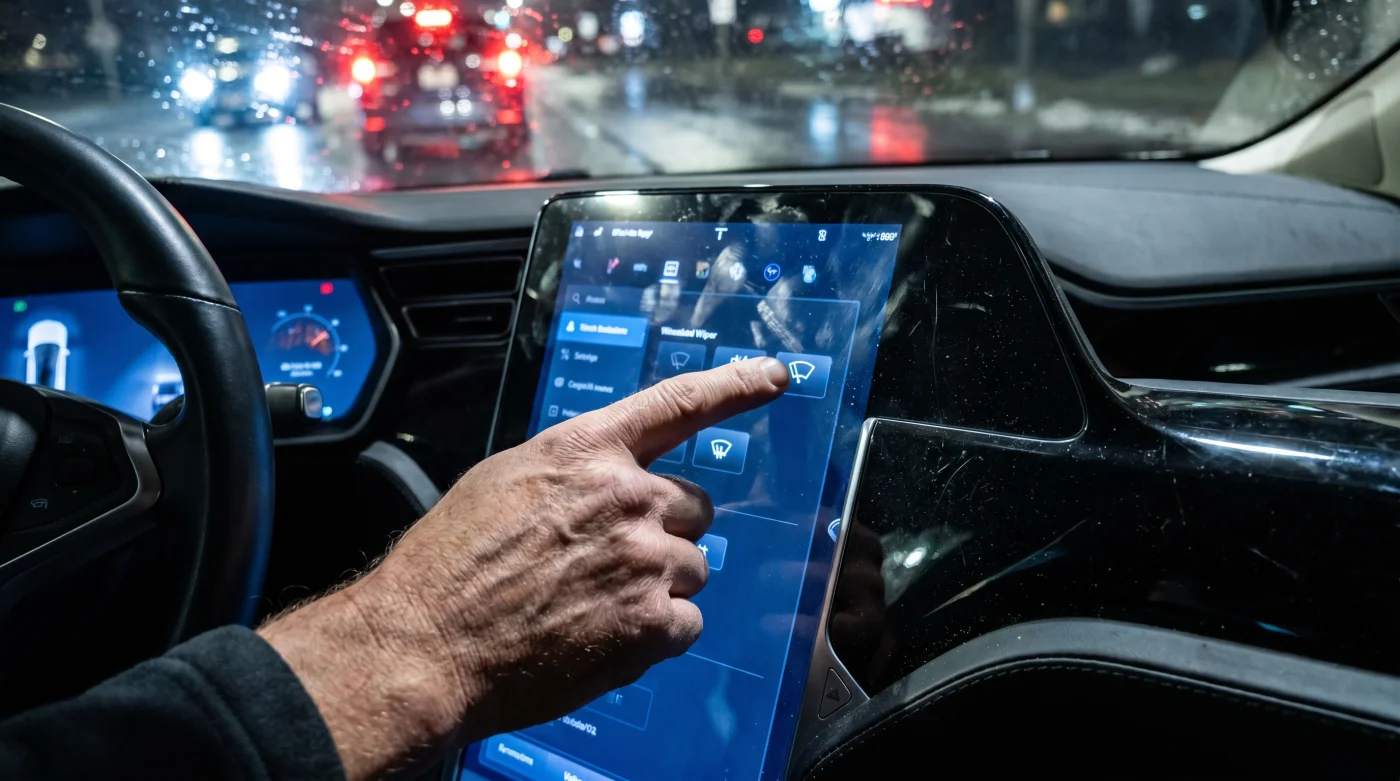
Instead, your fingers find **the cold, smooth pane of glass** dominating the center of your dashboard. The screen glows softly in the dark cabin, displaying a beautiful, high-resolution rendering of a minimalist landscape. To clear your vision, you must look away from the road, locate a tiny digital icon of a fan, tap it to bring up a secondary menu, and then slide a virtual blue bar to adjust the wiper speed to high.
You are traveling at sixty miles per hour, which means your vehicle covers eighty-eight feet every single second. During the four seconds it takes to navigate that slick digital menu, you drive almost the length of a football field completely blind. Tech reviewers praise this clean, button-free aesthetic as a triumph of modern engineering, but in the real world, it is a dangerous hazard masquerading as luxury.
The Glare of the Invisible Dashboard
We have traded muscle memory for visual hunting, turning what should be an intuitive mechanical act into a screen-time distraction. When every physical dial is swept away to clean up the interior lines of the newest electric cars, the vehicle ceases to be an extension of your body. It becomes a giant tablet on wheels. Think of a piano keyboard; a skilled pianist never looks at their fingers because they rely on the physical boundaries and spacing of the keys. By flattening the dashboard into a single, uniform sheet of glass, automakers have muted the tactile feedback that kept generations of drivers safe.
**Muscle memory is your quiet co-pilot**, allowing you to adjust the heater or defog the glass without ever taking your eyes off the highway. When you replace a tactile physical switch with a multi-layered digital menu, you force your brain to perform a complex sequence: find the screen, focus your eyes on a tiny graphic, aim your finger through the cabin vibrations of a moving car, and wait for a visual confirmation. This cognitive friction is a luxury we simply cannot afford when driving at highway speeds.
- Tesla Model 3 tire pressure settings expose a harsh factory calibration error
- Toyota Tundra recall notices trigger automatic insurance rate hikes unless contested directly
- AC Cobra coupe revival uses active aerodynamic panels hidden beneath carbon bodywork
- Dodge Viper successor leaks confirm a naturally aspirated hybrid V8 drivetrain
- Hyundai vehicle safety recall reveals mechanical steering overrides failing during automated driving
The Story Behind the Screen
Take Marcus Miller, a 44-year-old highway safety researcher from Michigan who spends hundreds of hours analyzing driver distraction data. Last winter, while testing one of the newest electric cars during a sudden lake-effect snowstorm, his windshield began to fog rapidly. He reached out to blast the defroster, only to realize the control was buried deep inside a climate submenu. He had to pull his vehicle onto the shoulder of a dark interstate just to clear his view. Marcus’s subsequent research confirmed what drivers are screaming about on forums: digital-only layouts double the amount of time a driver’s eyes spend looking away from the road compared to traditional analog dashboards.
The Three Zones of Touchscreen Friction
1. The Storm-Chaser: Wet Weather and Wiper Delay
**Split-second reactions save lives** when heavy downpours blind your field of vision. Relying on an automatic wiper sensor that fails to detect a light, freezing mist forces you into a dangerous digital search party just to clear your glass.
2. The Thermal Crisis: Frozen Fingers and Sub-Menus
When you step into a freezing cabin, your physical dexterity is compromised. Trying to target a tiny, twenty-pixel touch zone on a shaking screen to activate your heated seats is not just annoying; it pulls your focus entirely away from the icy road ahead.
3. The Midnight Blind Spot: Eye Adaptation
**Every bright flash of light** in a dark cabin constricts your pupils, making it incredibly difficult to see dark shapes on the road when you look back up. Glancing at a bright central screen to change your cabin air recirculating settings temporarily ruins your night-adapted vision.
Regaining Control: The Tactical Cabin Setup
You do not have to accept digital chaos as an unavoidable consequence of driving a modern electric car. With a few deliberate adjustments, you can reclaim your focus and make even the slickest screen-heavy dashboard work for you instead of against you.
**Master your vehicle’s voice commands** to bypass the need for physical searching altogether. While not a perfect solution, voice control keeps your hands on the wheel and your eyes on the road.
- Program your steering wheel’s custom shortcut buttons to handle critical functions like wiper speed or maximum defroster.
- Dim your central screen’s nighttime brightness to its lowest usable setting to preserve your eyes’ adaptation to the dark.
- Arrange your screen’s customizable home dock to place climate controls in static, unmoving positions.
- Learn to anchor your hand by resting your thumb or palm on the physical edge of the screen frame to stabilize your index finger against road bumps.
Think of this setup as your personal safety blueprint. By standardizing where your hands go and utilizing physical anchors, you minimize the dangerous seconds spent drifting into digital menus.
The Return to Tactility
The tide is finally beginning to turn as safety agencies begin to penalize vehicles that bury essential functions behind glass menus. There is an understated beauty in a physical dial that clicks when turned, or a solid toggle switch that snaps cleanly into place. It connects you directly to the machine you are operating, grounding you in the physical act of driving. True safety is quiet, intuitive, and always within reach without requiring you to look.
“The most elegant interface is the one you do not have to look at to use while traveling at seventy miles per hour.” — Marcus Miller, Human Factors Specialist
| Control Method | Reaction Time (Seconds) | Safety Impact for the Driver |
|---|---|---|
| Physical Stalk/Dial | 0.5 Seconds | Allows continuous road focus with zero eye deviation. |
| Voice Command | 2.0 to 4.0 Seconds | Keeps eyes on the road but introduces system latency. |
| Multi-tier Touchscreen | 4.0 to 8.0 Seconds | Forces eyes completely off the road, increasing lane drift risk. |
Frequently Asked Questions
Why are car manufacturers removing physical buttons if they are dangerous? Manufacturers save massive production and wiring costs by consolidating all controls into a single pre-built central computer screen.
Which functions are the most dangerous to bury in a touchscreen menu? Windshield wipers, defrosters, headlight controls, and basic temperature adjustments cause the most severe visual distractions.
Are safety agencies doing anything to stop this touchscreen trend? Yes, organizations like Euro NCAP are introducing safety rating penalties for cars that do not feature physical buttons for critical controls by 2026.
Can voice commands replace physical buttons in an emergency? No, voice control can fail due to poor cellular connections, loud passenger cabin noise, or software lag during crucial moments.
How can I make my current touchscreen car safer to drive? Utilize steering wheel shortcut buttons, stabilize your hand against the screen frame, and set up a clean, static home menu layout.