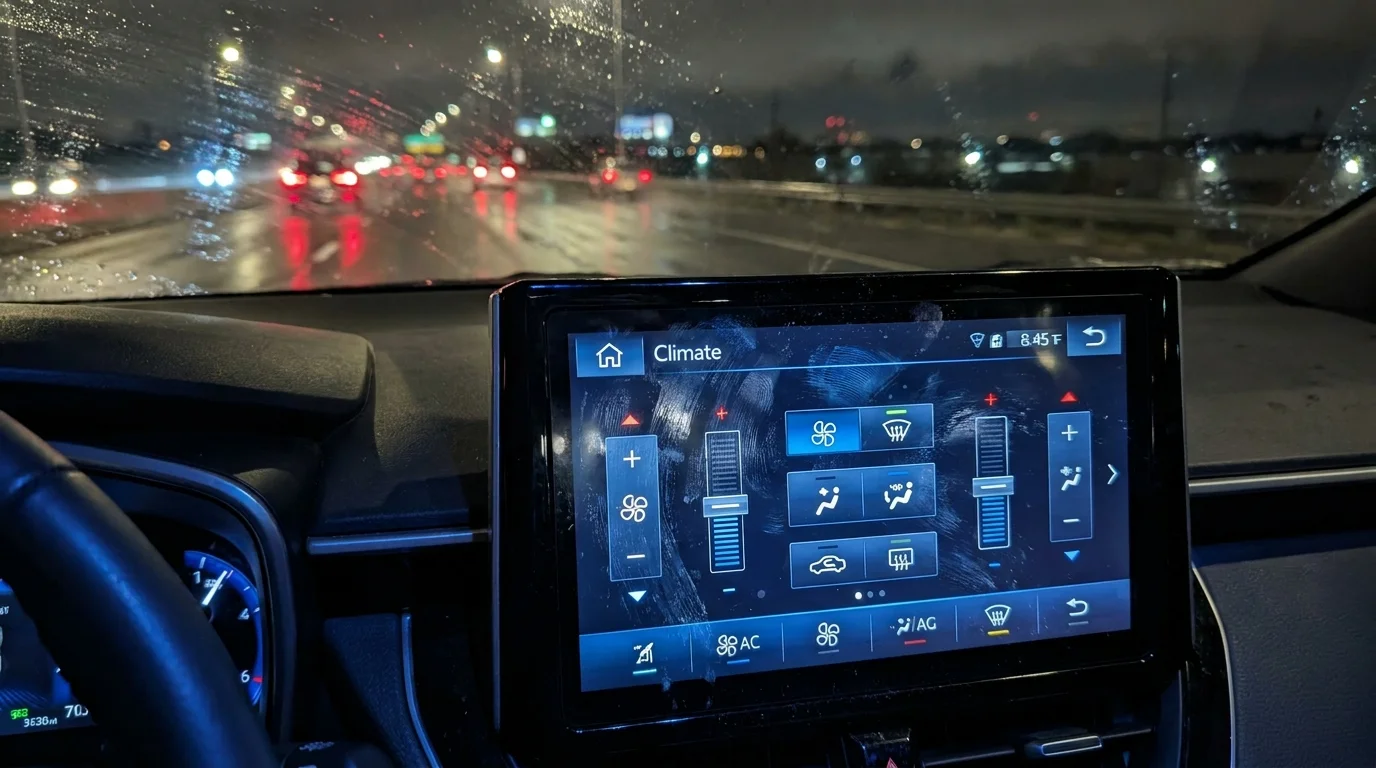
The morning air in late November carries a sharp, biting frost that coats your windshield in a stubborn, opaque sheet of white. Inside the cabin of the Subaru Outback, you turn the key or press the start button, waiting for that familiar, comforting blast of warm air. Instead, you are greeted by a massive, cold slab of glass—the 11.6-inch Starlink multimedia system. Under the low angle of the morning sun, the glossy black tablet screen reveals a chaotic map of greasy fingerprint smudges, dust motes, and oily streaks left behind from yesterday’s commute.
In older models, your hand would instinctively drift downward, finding the knurled, rubberized climate control dial without ever taking your eyes off the road. You could feel the satisfying, physical clicks as you cranked the heat to maximum. It was a muscle-memory dance performed in a fraction of a second, an unspoken understanding between driver and machine.
Today, that physical connection is gone. The latest updates have swept away those reassuring knobs, burying vital cabin functions deep inside a liquid-crystal display. What was once a mindless, tactile adjustment has transformed into a deliberate, visual chore that demands your undivided attention while the car rolls forward into the freezing mist.
The Illusion of Streamlined Progress
We have been conditioned to believe that eliminating physical buttons is the ultimate leap toward modern sophistication. Car manufacturers pitch these massive center displays as clean, minimalist sanctuaries that reduce cabin clutter. But this design philosophy relies on a fundamental category error: treating a moving vehicle like a stationary living room. A smartphone screen works because your feet are planted firmly on solid ground; it fails when your vehicle is bouncing over frost heaves at sixty miles per hour.
Think of your dashboard not as an entertainment center, but as a flight deck. When a cockpit is designed, critical survival controls are never hidden behind digital sub-menus. By turning the climate system into software, the vehicle erects a digital wall between you and the mechanical systems designed to keep you safe and comfortable.
- Ford F-150 EcoBoost turbo failure warnings vanish after swapping this cheap sensor
- Tesla Model Y vegan leather peels instantly after using basic sanitizing wipes
- Toyota Prius 200k-mile lifespans depend entirely on cleaning the battery fan
- Costco Auto Program discounts fail when dealerships mandate their own financing
- Mazda CX-5 used inspections require pressing the infotainment screen corners
Consider Marcus Vance, a 48-year-old volunteer paramedic in upstate New York who has spent two decades driving through Adirondack blizzards. “When you’re navigating a whiteout at five in the morning, your hand cannot afford to search for a flat virtual button,” Marcus says. He recalls a morning where his windshield began rapidly fogging over on a narrow two-lane highway, forcing him to pull over simply because he couldn’t find the defroster icon amidst the glare of his Outback’s smudge-laden screen. “In the old days, a physical button was a life raft you could find in the dark by feel alone.”
Adapting to the Digital Environment
For the Frozen Commuter
If your daily drive begins in sub-zero temperatures, the digital transition is particularly harsh. LCD screens rely on liquid crystals that naturally slow down when frozen, resulting in sluggish response times precisely when you need immediate feedback. You are left tapping a frozen pane of glass, unsure if the system registered your input or if it is simply lagging.
For the Dirt-Road Purist
Outback loyalists are notorious for getting their hands dirty, whether from mountain biking, fly fishing, or packing up a muddy campsite. Physical dials tolerate grit, grease, and gloved hands with ease. A touch screen, however, misinterprets the moisture on a damp finger or refuses to register a gloved touch entirely, forcing you to strip off your winter gear just to adjust the cabin temperature.
Navigating the Multi-Step Defrost Ritual
To safely coexist with this digital interface, you must re-engineer how you interact with your dashboard. The days of casual, on-the-fly adjustments are over; you now need a deliberate sequence of actions to clear your view and stay safe on the road.
To activate the windshield defroster while driving, you can no longer rely on a single physical tap. Instead, you must perform this precise mental checklist:
- Locate the climate bar at the very bottom of the massive center screen, taking care not to accidentally trigger the heated seat icon directly adjacent to it.
- Tap the climate expand icon to pull up the full-screen environmental overlay, which temporarily obscures your navigation map.
- Identify the front defroster button among the sea of identical flat blue and red digital touch zones.
- Press and hold firmly until the system confirms the change, then tap the collapse arrow to return to your primary driving screen.
The Tactical Winter Setup:
- Keep a microfiber cloth in the door pocket to swipe away glare-inducing smudges before starting your drive.
- Pre-set your temperature and fan speed using the MySubaru mobile app before stepping out into the cold.
- Utilize the steering wheel voice control button for basic temperature adjustments to keep your eyes on the road.
Reclaiming the Tactile Sanctuary
The loss of physical buttons is more than an aesthetic grievance; it is a quiet erosion of driver autonomy. When we strip the physical feedback from our daily tools, we lose a layer of intuitive control that keeps us grounded. The most luxurious feature a modern car can offer is not a high-definition screen, but the peace of mind that comes from predictable, physical utility. By mastering the quirks of this digital transition, you transform a potential winter hazard into a manageable routine, ensuring that your focus remains exactly where it belongs: on the open, icy road ahead.
“True vehicle safety isn’t found in a menu setting; it lives in the muscle memory of a driver’s hand.” — Marcus Vance, Winter Safety Specialist
| Key Point | Digital Screen Controls | Physical Dial Alternative |
|---|---|---|
| Defroster Activation | Requires a multi-tap menu sequence to open climate drawer | Instant, single-press physical button next to steering wheel |
| Sub-Zero Responsiveness | Liquid crystals freeze and lag, delaying heater startup | Instant mechanical connection works in any temperature |
| Gloved Usability | Requires capacitive gloves or bare skin to register | Rubberized knobs easily operated with heavy winter mitts |
Frequently Asked Questions
Can I use voice commands to control the defrost function? Yes, pressing the steering wheel voice button and saying “turn on front defroster” can bypass the screen menus entirely.
Why did Subaru remove the physical knobs? The consolidation of controls into a single large screen reduces manufacturing costs and allows for easy over-the-air software updates.
Does the screen display lag in extreme cold weather? Yes, capacitive touch screens and liquid crystal displays naturally experience slower refresh rates and delayed touch registration below freezing.
Are there any physical shortcuts left on the Outback dashboard? The newest layouts retain physical buttons for temperature adjustment arrows and hazard lights, but the fan speed and air direction are strictly digital.
What is the best way to clean the glossy screen without scratching it? Use a dry, high-density microfiber cloth and avoid harsh chemical cleaners which can strip the anti-glare coating over time.